

Highlight:
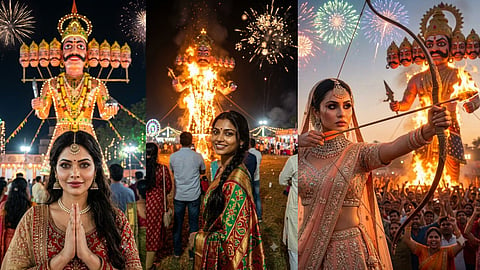
दशहरा के मौके के लिए इस असान तरह से AI तस्वीर बनाई जा सकती है।
इसके लिए Gemini और ChatGPT का इस्तेमाल किया जा सकता है।
AI वाली तस्वीर बनाने के लिए इन तीन 3 Prompt का इस्तेमाल किया जा सकता है।
How to create photos using Gemini: दशहरा पर रावण दहन देखने का मौका न मिला हो या मेले में अच्छी फोटो क्लिक नहीं करवा पाए हों तो निराश होने की जरूरत नहीं है। तो अब AI की मदद से आप अपनी ऐसी तस्वीर तैयार कर सकते हैं जिसमें पीछे विशाल रावण का पुतला, आतिशबाजी और मेले की रौनक देखने को मिलेगी। साथ ही इसके लिए आपको किसी खास फोटो एडिटिंग स्किल की जरूरत नहीं है। बस आपको अपनी एक साफ फोटो और सही AI प्रॉम्प्ट चाहिए और एक शानदार तस्वीर तैयार हो जाएगी।
इसके लिए Gemini और ChatGPT जैसे AI टूल्स में फोटो अपलोड करके उसमें बदलाव करने या नई तस्वीर तैयार करने के विकल्प मिलते हैं। लेकिन नतीजा आपके प्रॉम्प्ट, अपलोड की गई फोटो और टूल की क्षमता पर निर्भर करता है।
अगर आप चाहते हैं कि AI से बनी तस्वीर में आपका चेहरा पहचानने लायक रहे तो साफ और अच्छी रोशनी वाली फोटो अपलोड करें। साथ ही प्रॉम्प्ट में स्पष्ट लिखें कि चेहरे की पहचान, आंखों, नाक और चेहरे की बनावट को न बदलें। वहीं कपड़े, बैकग्राउंड, रोशनी और पोज के बारे में भी साफ निर्देश दें।
A hyper-realistic, cinematic photo of a young Indian [man/woman], wearing traditional festive attire, aiming a glowing flaming arrow towards a massive Ravan effigy at twilight. Colorful fireworks, warm firelight, a crowded mela ground, dramatic lighting, realistic facial details. Preserve the uploaded person's identity and facial features.
A realistic candid photo of an Indian [man/woman] wearing vibrant traditional Dussehra attire, standing in a crowded open field at night. A giant Ravan effigy is engulfed in flames with fireworks in the sky. Warm orange firelight illuminates the person's face, festive mela lights in the background, cinematic photography. Keep the uploaded person's face recognizable.
A close-up portrait of an Indian [man/woman] wearing ethnic wear, smiling and standing with folded hands in a Namaste pose before a towering multi-headed Ravan effigy at an illuminated Dussehra fair. Festive evening atmosphere, sharp focus, realistic photography, cinematic depth of field. Do not change the person's facial identity.
सबसे पहले Gemini या ChatGPT खोलें।
फिर फोटो अपलोड करने के विकल्प पर क्लिक करके अपनी साफ तस्वीर जोड़ें।
अब ऊपर दिए गए किसी एक प्रॉम्प्ट को कॉपी करके पेस्ट करें।
[man/woman] की जगह अपनी पसंद के अनुसार विकल्प चुनें और निर्देश भेज दें।
तस्वीर बनने के बाद जरूरत के मुताबिक बैकग्राउंड, कपड़ों या रोशनी में बदलाव भी मांग सकते हैं।
इसमें ध्यान रखें कि AI हर बार चेहरा बिल्कुल वैसा ही बनाए इसकी गारंटी नहीं है। बेहतर नतीजे के लिए प्रॉम्प्ट में स्पष्ट निर्देश दें और जरूरत पड़ने पर उसे सुधारते रहे ।